← Back to projects / AirTOP Utility
Simulation recording utility PUBLIC PORTFOLIO VIEW

AirTOP Utility

AirTOP Video Recorder

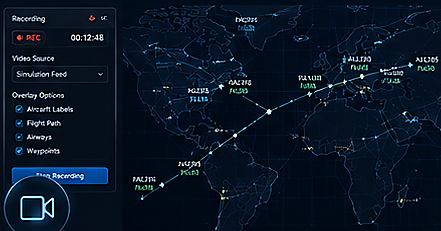
Records approved AirTOP simulation views with configurable overlays, playback review and controlled local export options.
ROLE Recording workflow, overlay controls and export experience design
DELIVERY MODEL Specialist-governed · Human-reviewed
Java AirTOP Video Capture Overlay Controls Playback Export
AirTOP Video Recorder public interface preview
CAPABILITY PREVIEW Public-safe interface representation
Privacy and confidentiality protected

Public portfolio summary. Recorded operational scenarios, model layouts, user identities and restricted simulation footage are intentionally excluded.

01

PROJECT OVERVIEW

From operational need to controlled delivery

A

THE CHALLENGE

Operational need

Simulation behaviour can be difficult to communicate through static screenshots or raw result files alone.

B

ENGINEERED RESPONSE

Solution approach

A custom recording workflow captures approved simulation activity, supports overlay and playback controls, and produces reviewable visual evidence.

C

VALUE CREATED

Operational impact

Makes simulation behaviour easier to review, explain and reuse in training or stakeholder presentations without publishing restricted footage.

02

CONTROLLED WORKFLOW

A clear specialist-led path from source to result

01

Choose source

Select an approved AirTOP display or simulation view

02

Configure overlays

Choose labels, paths, waypoints and annotations

03

Record session

Start, pause, resume and stop capture

04

Review playback

Inspect timing, visibility and presentation quality

05

Add metadata

Apply approved study and scenario labels

06

Export evidence

Create a controlled shareable recording

03

DEVELOPED CAPABILITIES

Complete public-safe feature inventory

The list below describes the developed capability without exposing operational records, source-system credentials, private mappings or proprietary implementation details.

01

Recording controls

Provides a simple specialist workflow for capturing simulation activity.

  • Selects the approved simulation display source.
  • Starts, pauses, resumes and stops recording.
  • Shows the current recording state and elapsed duration.
  • Protects against accidental duplicate recording sessions.
  • Supports controlled cancellation before export.
  • Keeps controls readable while the simulation is active.
02

Aviation overlays

Adds the context needed to explain model behaviour.

  • Includes aircraft labels where authorised.
  • Shows selected trajectory and flight-path information.
  • Supports waypoint, airway and sector overlays.
  • Allows optional annotations for review or training.
  • Keeps overlays configurable to avoid visual clutter.
  • Preserves the original simulation view when overlays are disabled.
03

Output configuration

Balances image quality, file size and intended use.

  • Supports selectable output resolution.
  • Supports configurable frame-rate and quality settings.
  • Uses clear output file naming and destination selection.
  • Adds approved study, scenario and recording metadata.
  • Checks available storage before long recordings.
  • Provides an export progress and completion state.
04

Playback and review

Makes captured evidence easy to validate before sharing.

  • Previews the recording inside the utility.
  • Supports play, pause, seek and restart controls.
  • Shows duration and basic recording metadata.
  • Allows the specialist to reject and re-record unsuitable output.
  • Supports review notes before final export.
  • Keeps unpublished recordings separate from approved evidence.
05

Evidence management

Supports repeatable use in review, training and presentation workflows.

  • Maintains a local recording history.
  • Supports clear scenario and version labels.
  • Allows approved recordings to be reused in reports or presentations.
  • Separates draft, reviewed and published states.
  • Provides a simple record of export date and format.
  • Avoids placing restricted recordings on public portfolio pages.
06

Operational safeguards

Protects sensitive simulation material throughout the workflow.

  • Records only approved displays and scenarios.
  • Avoids automatic external upload or cloud sharing.
  • Keeps export destinations under specialist control.
  • Supports local deletion of rejected recordings.
  • Does not expose real operational footage in the public site.
  • Uses clear user confirmation before final export.
04

SOLUTION ARCHITECTURE

High-level design without sensitive implementation exposure

01

AirTOP display

Approved simulation view selected by the specialist

02

Capture controller

Recording state, timing and source management

03

Overlay layer

Optional aviation labels and annotations

04

Playback review

Quality check and approval before publication

05

Local export

Controlled video output and recording history

05

CAPABILITY EVIDENCE

Designed outcomes

Clear visual evidence of simulation behaviour.

Easier operational review, training and stakeholder explanation.

Consistent recording and export process.

Reduced reliance on disconnected screenshots.

Restricted simulation footage remains outside the public website.